Contents10 sections
There's no single best DM tool, because prep isn't one job. Building a world, writing an adventure, balancing a fight, laying out the book and running the game each have tools built for them, and the right setup is usually two or three tools that each do one job well. The wrong setup is a dozen tools, most of them open in tabs that seem to disappear the moment you need them.
This guide sorts the most popular options by the job they do, and for each job says which tool to start with and when another is the better choice. Session Zero Labs is ours. We recommend it where it does the job well, and say plainly where something else does it better. Prices change often, so the guide describes how each tool charges (free, a free plan with paid extras, a subscription or a one-time license) rather than quoting numbers.
Start with the job, not the tool
Before comparing tools, decide which of these jobs you need help with:
- Build the world: the places, maps, factions and history your campaign happens in.
- Write the adventure: the story, the NPCs, the quests and the hooks that pull the party in.
- Build the encounters and rewards: monsters, stat blocks and difficulty math, then what the party gets afterward, from treasure and magic items to XP.
- Lay out the book: turning it all into something that reads like a published adventure, for your own table or to share.
- Run the game: maps, dice, initiative and quick lookups at the table, and the session notes that keep the campaign straight between sessions.
Most frustration with DM tools comes from asking a tool to do a job it wasn't built for, like a wiki that can't balance a fight, or a virtual tabletop used as a notebook. Both happen more often than anyone wants to admit.
Build the world
Session Zero Labs is for building the whole world, from its continents and kingdoms down to the people, creatures and treasure in a single room. The Location Builder works without an account, places nest inside each other. With a free account AI Generation can turn your idea for a location into a first draft of it and the places inside it, for you to keep, change, or throw out. It currently keeps less lore than a worldbuilding wiki, and generally isn't built for publishing an entire world to readers.
Session Zero Labs also has robust map making functionality. Where Azgaar's invents a random world, Generate Map draws the places you've already built. That can be a continent or region, a city, a dungeon or a single room, laid out from what's inside it and how those places connect. You choose the details, from the number of landmasses and how jagged the coastline is to a dungeon's overall shape and whether it's made from constructed halls or natural caverns. Beautify Map then paints the result, or any map you draw or upload, into finished artwork like the maps in a published adventure, keeping your layout and points of interest. Uploading your own map, the drawing tools, Generate Map and Beautify Map all work on a free account. Generate Map counts toward your monthly AI Generation, and a free account can beautify up to 3 maps a month.
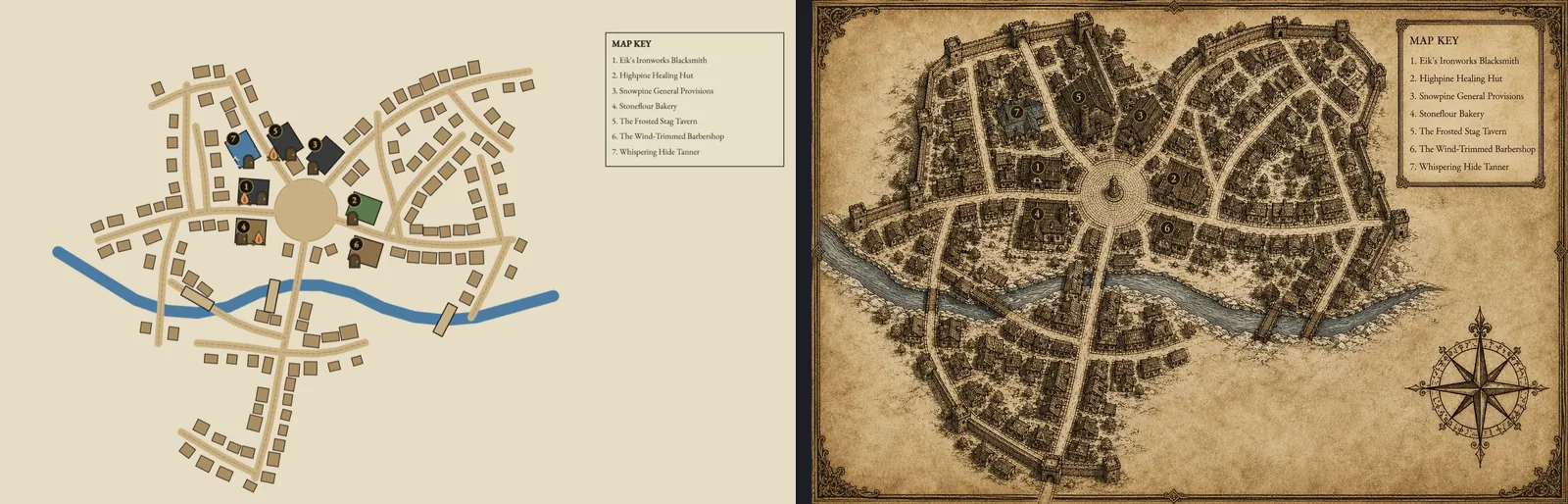
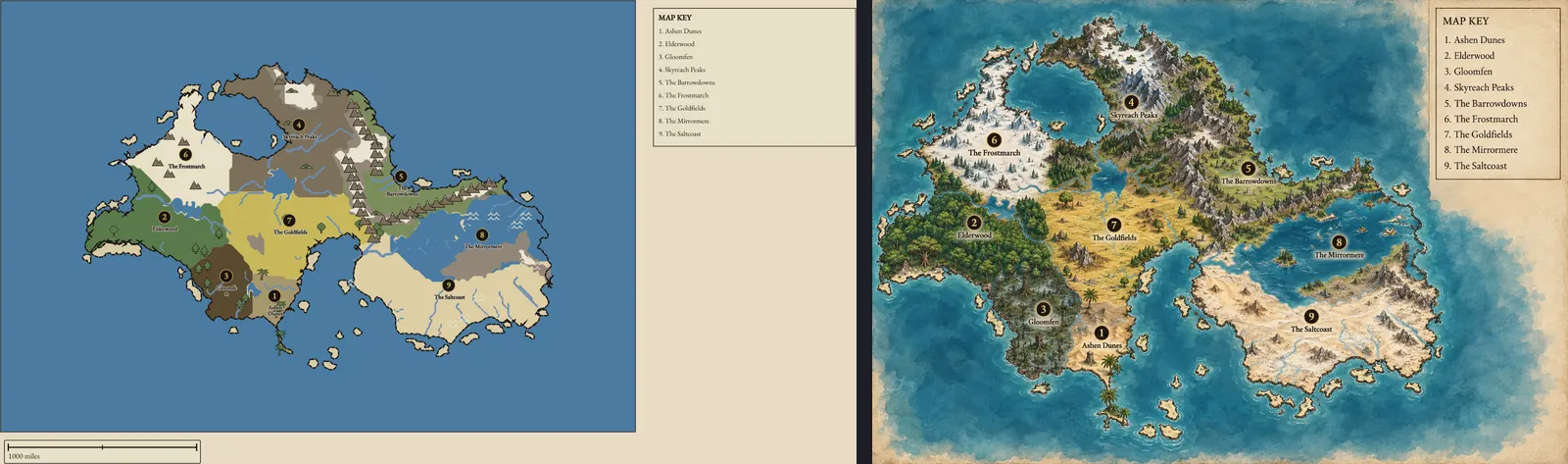
Another tool is the better pick in a few specific cases:
- You want to place every coastline and mountain yourself. Inkarnate runs in the browser and paints polished maps from its own art. The free plan covers the basics, and paid plans add more art, larger exports and more maps. Wonderdraft (world and region maps) and Dungeondraft (dungeons and caves) are desktop apps sold as one-time licenses, with no subscription.
- You want a random world without building it first. Azgaar's Fantasy Map Generator builds a whole random world in seconds, free and open source, and you edit it toward what you want.
- The world itself is the product, for players and readers to browse. World Anvil is the most complete worldbuilding wiki. On the free plan your articles are public, and private worlds and secrets need a paid Guild membership. LegendKeeper is fast and focused, with excellent maps, but needs a subscription to create projects.
Write the adventure
Session Zero Labs treats the adventure as connected pieces. The NPC Builder works without an account, and with a free account every NPC, quest and scene joins the campaign. When needed, AI Generation can help draft an entry from your short idea or fill in one field at a time, and everything it writes is yours to edit. Story Flow lays out the arcs, adventures, quests and scenes in the order they play, and a quest knows its giver, its allies and its antagonist.
DM Assist works like a chat assistant that knows your campaign. It can take your suggestions and create or update entries for you, as well as offer suggestions on fleshing out the NPCs, places, and encounters. It works from your ideas and your campaign, and you decide what goes in. A free account includes a monthly allowance to help you get started. A general AI chat assistant can brainstorm too, but what it writes lives in a chat, so you copy what you keep into your notes.
Another tool is the better pick in a few specific cases:
- You want your adventure as plain files you own. Obsidian is a favorite for writing adventures. Every NPC, place and scene is its own note, linked to the others, in Markdown files on your own computer. It's free, and you set up the structure yourself.
- You already plan everything in Notion. Notion's databases can hold NPCs and quests, as long as you build the templates yourself.
- You need a random name or dungeon this second. donjon has been the go-to for random names, dungeons and treasure for years, free and with no account.
Build the encounters and rewards
For most DMs, the free Session Zero Labs Encounter Builder covers this job. It rates fights for D&D 5e (2014 and 2024 rules), Pathfinder 2e and Starfinder 2e as you build them, with the full SRD monster library and no account needed. A free account adds your own creatures and your campaign's NPCs, on either side of the fight, and it counts allies, which the rulebooks don't cover. The encounter also doesn't end at the calculator. It keeps its read-aloud text, tactics and treasure, sits in the story's order, and prints in the book. Encounter Difficulty and XP Budgets explains the math behind it, including the XP the party earns.
Another tool is the better pick in a few specific cases:
- You need official monsters outside the SRD and don't want to build them. D&D Beyond Encounters uses every monster in the books you own there, with full stat blocks, and runs the fight with initiative and hit points. The free tier limits how many encounters you can save.
- You want a random encounter from the official books in a few seconds. Kobold+ Fight Club lists monsters from the Monster Manual and other official books by challenge rating and source, and generates a random encounter at the difficulty you pick. For anything outside the SRD, you'll read the stat block in your own copy of the book. Its maintainers are looking for new help.
- You run Pathfinder 2e and need a rule or creature the SRD doesn't cover. Archives of Nethys is the official reference for every Pathfinder 2e rule and creature, free.
Rewards are the other half of an encounter. For many players, it's at least as important as the encounter itself. The 2014 Dungeon Master's Guide has treasure hoard tables by challenge rating, and Pathfinder 2e gives a treasure budget for each level, which Archives of Nethys lists as Treasure by Level. donjon rolls random treasure hoards in one click.
In Session Zero Labs, each encounter has a Rewards tab that gathers the loot its creatures carry. The free Loot Table Builder makes rollable tables of SRD items and your own gear, along with the die you roll and quantities like 2d6. With a free account, you can link them to encounters, creatures and places, so a dungeon room or a bank vault has its own table and it's easy to see what in your campaign uses each one. They also show up in the encounter, creature and place themselves, giving you bidirectional visibility between the loot and where it drops in your campaign.
Lay out the book
For most DMs, Session Zero Labs is the shortest path to a book. Everything from the sections above is already a record in the campaign, so the export decides where each piece goes. It handles the keyed locations, read-aloud boxes, creatures in bold and stat blocks in the appendix, as a PDF, as Markdown or as a Homebrewery file, free with an account. You give up page-by-page control, and you don't have to lay anything out. How to Format a Homebrew Adventure walks through it step by step.
Another tool is the better pick in a few specific cases:
- You want to design every page yourself. Homebrewery is the standard for homebrew that looks like an official book, and it's free. You place every read-aloud box, stat block and page break. GM Binder works the same way with a different editor, and its free account covers the basics. You can start from Session Zero Labs' Homebrewery export and finish by hand.
- You already write in LaTeX. The LaTeX template produces beautiful pages and numbers areas for you, with a steep learning curve for anyone who doesn't know LaTeX.
- You're making a print product with its own look. Desktop publishing apps like Affinity Publisher or InDesign give you full control over the design.
Run the game
At the table
For a game at a physical table, Session Zero Labs exports what you need to run it. That can be the whole campaign as a book, or just one story arc, adventure or quest. The book's Session prep preset puts the stat blocks next to each encounter, and Read-aloud script prints only the boxed text, in play order. If you only need one thing, export a single entry on its own instead, such as your own NPC, creature, item, place, encounter or loot table, as Markdown with no account or as a PDF with a free one. Each encounter page also carries its creatures' stat blocks, for running straight from the app. Its free SRD Library puts the D&D 5e and Pathfinder 2e SRD monsters, spells and items each on its own page, with no account needed. For dice, its free 3D Dice Roller throws any mix of d4 to d100 with a modifier, and the dice in stat blocks, spells and loot tables roll in it with a click, from an attack's "+4 to hit" to a whole encounter's initiative.
Session Zero Labs isn't a virtual tabletop, though, and a rules question at the table stops the game until someone answers it. Nothing kills the mood like four people searching for the grapple rules at once, and everyone interpreting them differently. Another tool is the better pick in these cases:
- You play online. You need a virtual tabletop. Foundry VTT is a one-time license you host yourself or through a hosting service, with deep system support and modules. On a paid plan, Session Zero Labs exports your creatures, NPCs, items, spells and places, and any SRD entry, to Foundry. Roll20 runs in the browser with a free tier and a large marketplace of official content. Owlbear Rodeo is a light, fast map-and-token table that's free to start. Foundry and Roll20 both track initiative and hit points during a fight.
- Your players build their characters on D&D Beyond. D&D Beyond keeps their character sheets with their class features, spells and items, searchable during play, with the full text of what you own. Its Encounters tool runs the fights you built there.
- You run Pathfinder 2e and need a rule fast. Archives of Nethys has every Pathfinder 2e rule, spell and item, free.
Across the campaign
After every session, something in the world has changed. An NPC died, a town burned, or the party owes a dragon a favor. Keeping that current is what makes a campaign feel consistent.
Session Zero Labs keeps a recap for each session, and a public link to share it with your players. On a paid plan, AI turns your rough notes into a recap you can edit, and ties it to the NPCs, places and quests it touched, so each NPC's page shows the sessions they appeared in. It also suggests updates for you to apply or dismiss, like a note on an NPC about what happened to them, or a quest's new status and a line for its progress log. Its records are made for running a game. An NPC can be a combatant in an encounter, carry an item and appear in a session recap, and the book prints it with its encounters and gear.
Another tool is the better pick in a few specific cases:
- You want a full wiki of the campaign's lore, on a free plan. Kanka gives you most of a worldbuilding wiki's structure, with a generous free tier, and works well as a running record of the campaign.
- You want your notes as plain files you own. Obsidian keeps everything as Markdown files on your computer, and its community plugins add stat blocks and initiative tracking. You set it up yourself.
Where Session Zero Labs fits
To be clear about our own tool:
- It's strong at creating a campaign, not just organizing one. The builders help you make the NPCs, creatures, places, encounters, quests and loot in the first place. AI Generation and DM Assist are there when you want a first draft or a second opinion, and the ideas and the final say stay yours. Each one then links to the others once and shows up everywhere it belongs in the campaign. Places get maps generated from what's inside them, and the whole campaign exports as a book laid out like a published adventure. The builders work without an account, and a free account adds AI Generation, the map tools, a monthly DM Assist allowance and book export.
- It's not built for hand-painting a map piece by piece (Inkarnate and Wonderdraft are), publishing a world for readers (World Anvil is), page-by-page layout control (Homebrewery is), every official monster (D&D Beyond has them, if you own them), or running the session online (that's a virtual tabletop's job).
- It supports D&D 5e (2014 and 2024 rules), Pathfinder 2e and Starfinder 2e, with a system-neutral mode for other games.
Setups that work well together
- Most campaigns: Session Zero Labs for the world, the adventure, the encounters and the book, plus a virtual tabletop if you play online.
- Official monsters beyond the SRD: Session Zero Labs for prep, with D&D Beyond for the monsters you own and your players' character sheets.
- Hand-drawn maps: Inkarnate or Wonderdraft when you want to place every coastline and mountain yourself, then Session Zero Labs for the places and people on it.
- Hand-styled homebrew: Session Zero Labs to build and organize, exported to Homebrewery to style page by page.
- A public world: World Anvil for the lore players read, and Session Zero Labs for the sessions you run in it.
- All local files: Obsidian for your notes, with Session Zero Labs for encounters and the book, exported as Markdown into your vault.
- Pathfinder: Session Zero Labs for prep and encounter math, Archives of Nethys for rules, and Foundry's Pathfinder system to play online.
Your tool checklist
Ask these, in order:
- Which job above takes most of your prep time? Pick a tool for that job first.
- Who else needs to see it: just you, your players, or readers online?
- Do you want to control the layout, or just have it done?
- Which system do you run? Check that the tool supports your edition, not just "5e".
- What happens to your work if you stop paying? Look for exports to files you can keep.
Every tool in this guide has a free way to try it. Spend an evening prepping one real session in your top two before you move a whole campaign. Moving a whole campaign is a lot of copying and pasting to find out you hate the search bar.
Sources. Plan details were checked in November 2026 against each tool's own pages:
Frequently asked questions
What is the best free DM tool?
It depends on the job, and Session Zero Labs is free for most of it. Its builders and its Encounter Builder work without an account, and the Encounter Builder rates fights for D&D 5e (2014 and 2024 rules), Pathfinder 2e and Starfinder 2e. A free account adds book export, which lays the whole campaign out for you, and AI Generation to help draft entries from your own ideas. Other free tools are the better pick for specific needs. Azgaar’s Fantasy Map Generator makes a free world map, Homebrewery lets you style every page by hand, Obsidian keeps your notes as plain files you own, and D&D Beyond Encounters uses official monsters beyond the SRD, if you own the books there.
Is Session Zero Labs a virtual tabletop?
No. It is where you prepare: NPCs, places, encounters, quests and the book. Run the session from the book, the encounter pages or a virtual tabletop such as Foundry VTT, Roll20 or Owlbear Rodeo. On a paid plan, Session Zero Labs exports creatures, NPCs, items, spells, places and SRD entries to Foundry VTT.
Can I use Session Zero Labs with Homebrewery?
Yes. Export a campaign, story arc, adventure or quest as a Homebrewery file, open it in Homebrewery and keep styling it by hand.
What is the difference between World Anvil and Session Zero Labs?
World Anvil is a worldbuilding wiki, at its best when the world itself is something players and readers browse. Session Zero Labs is built for running games: its NPCs, creatures and places plug into encounters, quests and session recaps, and export as a book.
Which DM tools support Pathfinder 2e?
Archives of Nethys is the official Pathfinder 2e rules reference. Foundry VTT has a full Pathfinder 2e system. Session Zero Labs supports Pathfinder 2e and Starfinder 2e stat blocks and encounter math, and system-agnostic tools such as World Anvil, Kanka and Obsidian work for any game.
Free tools that help
Encounter Builder
Balance fights for any party in D&D 5e, Pathfinder 2e or Starfinder 2e. Search the full SRD monster list or add custom creatures, free with no account. Sign up free to pull in your own creatures and your campaign’s NPCs.
Open the Encounter Builder →NPC Builder
Build detailed NPCs for D&D 5e, Pathfinder 2e, Starfinder 2e, or any tabletop system: appearance, personality, backstory, secrets, and stat blocks. Free, no account required.
Open the NPC Builder →Location Builder
Build the places of your world: cities, dungeons, wilderness, taverns, and beyond. Type-specific fields for every location kind. Free, no account required, and a free account adds AI Generation and DM Assist.
Open the Location Builder →